
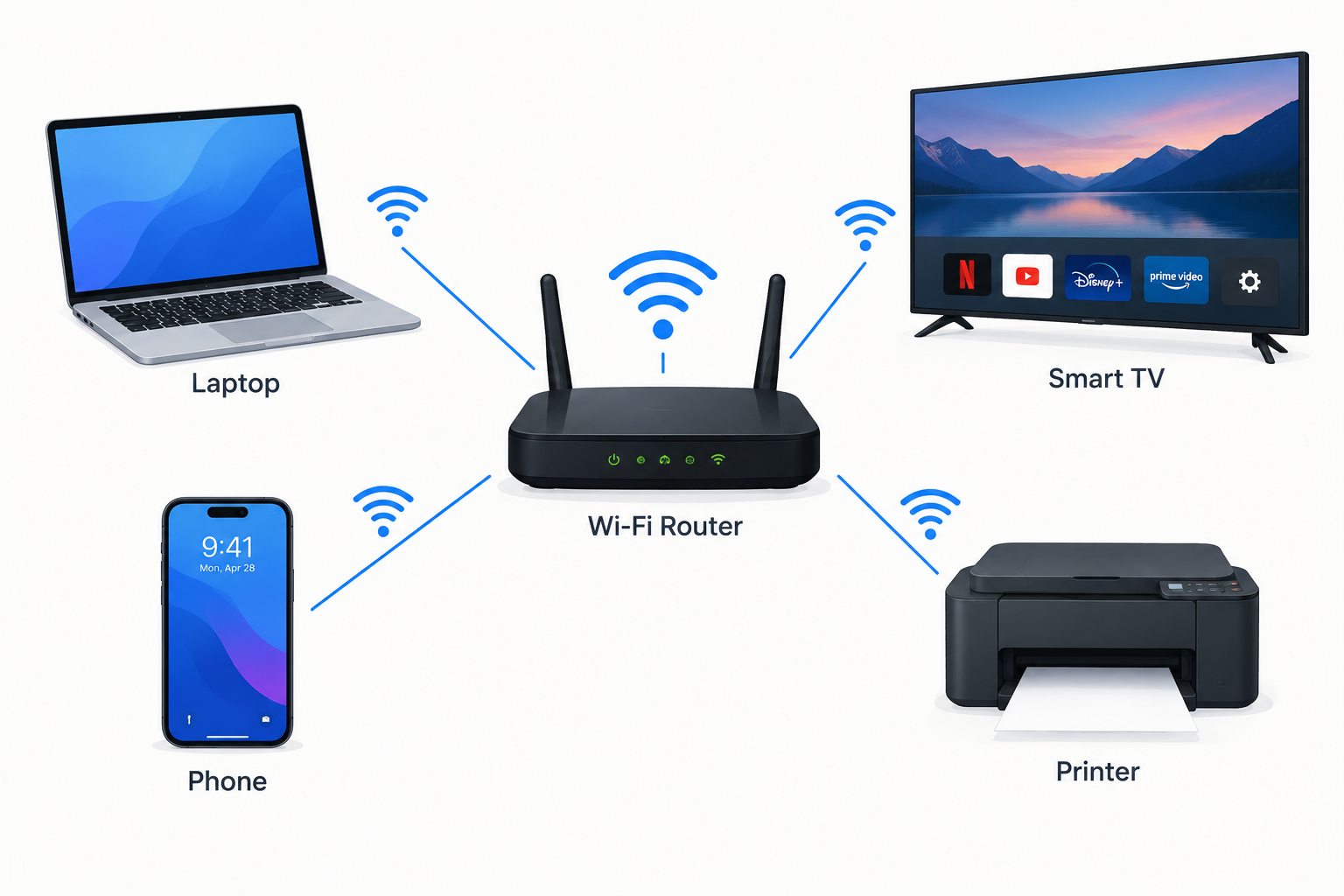
Connecting People, Devices & Information
COMPUTER NETWORKING
Connecting Devices, Sharing Information
Presented by: ZOYA RASHID
Class: ICS (PHY) – PART 2ND
Subject: COMPUTER SCIENCE
Teacher: SIR ASAD
1 — What Is Computer Networking?
A computer network is a group of two or more computers or devices connected together so they can communicate and share resources and information.
A network allows devices to share:
- Files and data
- Internet connections
- Printers and other hardware
- Applications and services
- Messages and information
2 — Why Do We Need Computer Networks?
Computer networks make communication and information sharing easier and faster.
Main purposes:
- Communication — sharing messages and information
- Resource sharing — sharing printers, files, and internet
- Data sharing — transferring information between devices
- Collaboration — allowing people to work together
- Centralized management — managing data and devices efficiently
3 — Basic Components of a Network
A computer network usually contains several important components:
i. Devices / Nodes
Computers, phones, printers, servers, cameras, etc.
ii. Network Media
The method used to connect devices.
Examples:
- Ethernet cables
- Fiber-optic cables
- Wi-Fi
- Bluetooth
iii. Network Devices
Devices that help networks communicate.
Examples:
- Router
- Switch
- Modem
- Access Point
iv. Protocols
Rules that allow devices to communicate correctly.
Example:
TCP/IP
4 — Types of Computer Networks
Networks can be classified according to their size and coverage area.
Main Types:
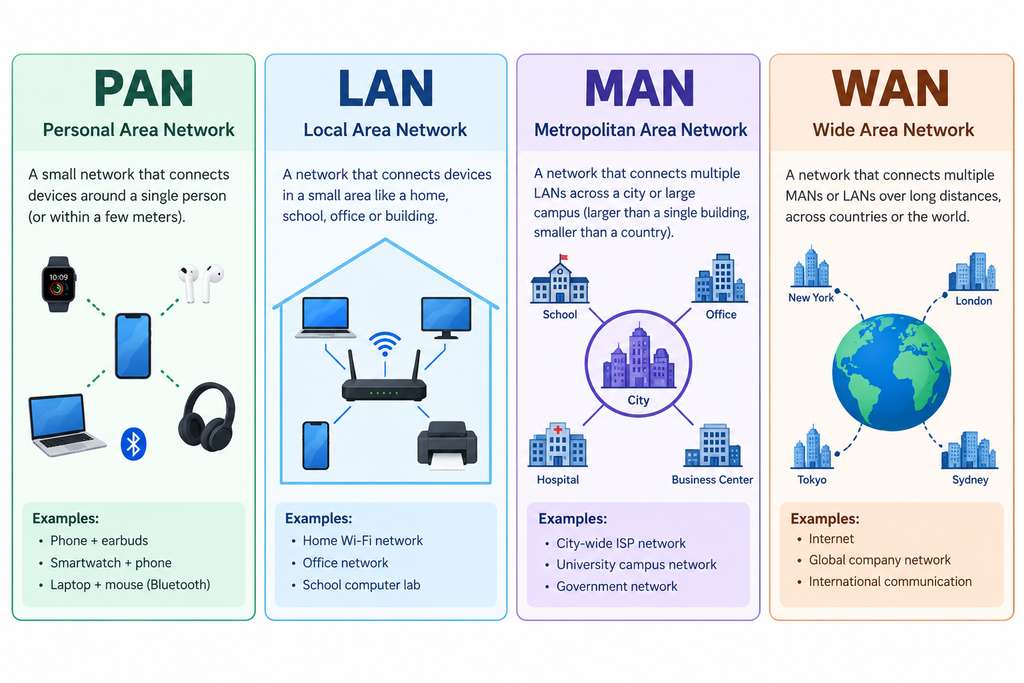
- PAN — Personal Area Network
- LAN — Local Area Network
- MAN — Metropolitan Area Network
- WAN — Wide Area Network
Other specialized types include:
- WLAN — Wireless Local Area Network
- CAN — Campus Area Network
i. PAN (Personal Area Network)
What is PAN?
A Personal Area Network is a small network used around one person.
It usually connects personal devices over a short distance.
Examples:
- Phone connected to wireless earbuds
- Phone connected to a smartwatch
- Laptop connected to a Bluetooth mouse
- Phone sharing internet through a hotspot
Range:
Usually a few meters.
Common technologies:
Bluetooth, USB, Wi-Fi
ii. LAN (Local Area Network)
What is LAN?
A Local Area Network connects devices within a limited area such as:
- Home
- School
- Computer laboratory
- Office
- Building
Examples:
A school computer lab may connect 20 computers to the same network.
Advantages:
- Fast communication
- Easy file sharing
- Resource sharing
- Usually inexpensive to maintain
iii. WLAN (Wireless LAN)
What is WLAN?
A Wireless Local Area Network is a LAN that uses wireless communication instead of physical network cables.
Example:
The Wi-Fi network in your home is usually a WLAN.
Devices may include:
📱 Smartphones
💻 Laptops
📺 Smart TVs
🖨️ Wireless printers
Main technology:
Wi-Fi
iv. MAN (Metropolitan Area Network)
What is MAN?
A Metropolitan Area Network covers a larger area than a LAN, usually across a city or large campus.
Example:
A network connecting several branches of an organization throughout a city.
Characteristics:
- Larger than LAN
- Smaller than WAN
- Can connect multiple LANs
- Often used by organizations and service providers
v. WAN (Wide Area Network)
What is WAN?
A Wide Area Network connects networks over very large geographical areas.
It can connect:
- Cities
- Countries
- Continents
The Internet is the largest example of a WAN.
Other examples include networks used by:
- Banks
- International companies
- Universities
- Government organizations
Comparison of Network Types
| Type | Full Form | Coverage | Example |
| PAN | Personal Area Network | Very small | Phone + smartwatch |
| LAN | Local Area Network | Building/area | School lab |
| MAN | Metropolitan Area Network | City | City-wide organization network |
| WAN | Wide Area Network | Countries/world | Internet |
| WLAN | Wireless LAN | Local area | Home Wi-Fi |
5 — Network Topology
What is Network Topology?
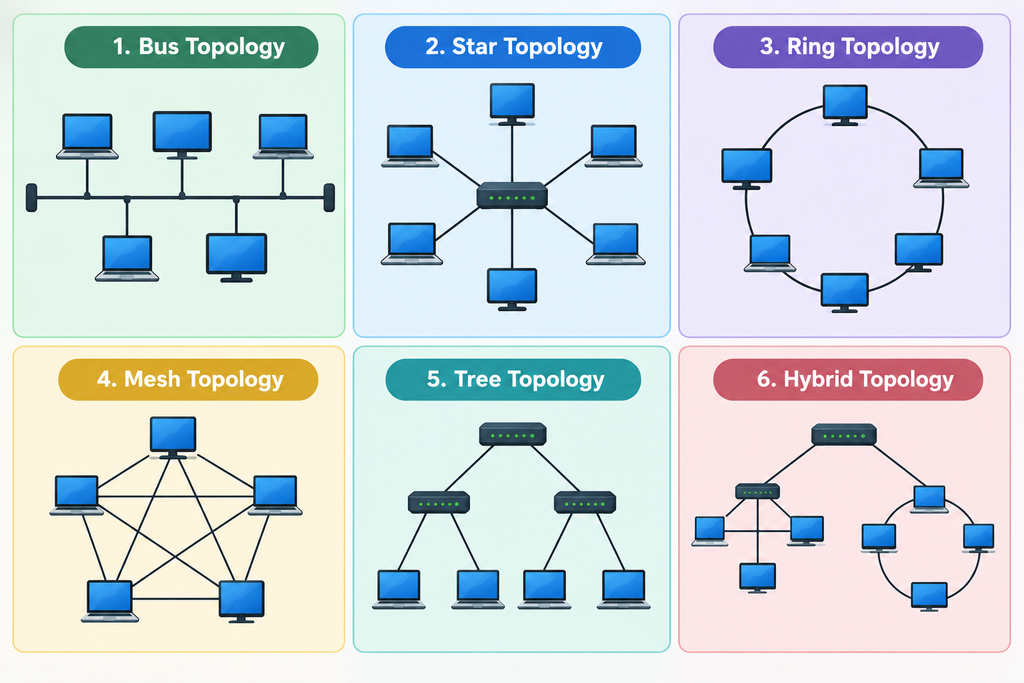
Network topology describes how devices are arranged and connected in a network.
Common topologies:
- Bus Topology
- Star Topology
- Ring Topology
- Mesh Topology
- Tree Topology
- Hybrid Topology
i. Star Topology
In a Star Topology, all devices are connected to a central device such as a switch.
Example:
Computer → Switch ← Computer
Advantages:
- Easy to manage
- Easy to add devices
- Failure of one cable usually affects only one device
Disadvantage:
If the central device fails, communication can be disrupted for connected devices.
ii. Bus Topology
In a Bus Topology, all devices share a single main communication cable called the backbone.
Advantages:
- Simple design
- Uses less cable
- Can be inexpensive for small networks
Disadvantages:
- A problem with the main cable can affect the network
- Performance can decrease as more devices are added
iii. Ring Topology
In a Ring Topology, each device is connected to two other devices, forming a circular arrangement.
Advantages:
- Organized data transmission
- Each device has a connection to the next device
Disadvantages:
- A failure can affect communication around the ring
- Adding or removing devices can be more difficult
iv. Mesh Topology
In a Mesh Topology, devices have multiple connections to other devices.
Advantages:
- High reliability
- Multiple paths for data
- A single connection failure may not stop communication
Disadvantages:
- Expensive
- Requires more cables and connections
- More difficult to manage
Example:
Some critical communication networks use mesh-like designs for reliability.
6 — Network Devices
Router
Connects different networks and directs data between them.
Switch
Connects devices within a network and forwards data to the appropriate device.
Modem
Connects a network to an internet service through the service provider’s connection.
Access Point
Provides wireless network access to devices.
Network Interface Card (NIC)
Allows a device to connect to a network.
7 — How Does a Network Work?
When you send information through a network:
i. Data is created
You send a message, open a website, or upload a file.
ii. Data is divided into packets
Large information is broken into smaller pieces.
iii. Packets travel through the network
Network devices direct the packets toward their destination.
iv. The destination receives the packets
The packets are reassembled into the original information.
v. The information is displayed
The receiver sees the message, website, image, or file.
8 — Network Protocols
A network protocol is a set of rules that allows devices to communicate.
Important protocols:
TCP/IP
The fundamental protocol suite used for communication over the Internet.
HTTP / HTTPS
Used for communication between web browsers and web servers.
FTP
Used for transferring files.
DNS
Converts domain names such as websites into IP addresses.
DHCP
Automatically provides network configuration information such as IP addresses.
9 — IP Address
An IP address is a numerical address used to identify a device on a network.
Example:
192.168.1.10
Devices use IP addresses to identify where data should be sent.
Two common versions:
- IPv4
- IPv6
IPv6 was developed to provide a much larger number of available addresses.
10 — Internet vs World Wide Web
These two terms are often confused.
Internet
The Internet is the worldwide network of interconnected networks.
World Wide Web (WWW)
The Web is a service that operates over the Internet and allows us to access websites and web pages.
In simple words:
Internet = Network infrastructure
Web = Websites and web pages accessed through it
11 — Uses of Computer Networking
Computer networks are used in almost every field.
Education
- Online classes
- Digital libraries
- School computer labs
Business
- File sharing
- Online meetings
- Company systems
Healthcare
- Sharing medical information
- Hospital systems
- Telemedicine
Banking
- ATMs
- Online banking
- Electronic transactions
Entertainment
- Online gaming
- Streaming
- Social media
12 — Computer Networks in Daily Life
We use networks every day, often without realizing it.
At Home
📱 Phone connected to Wi-Fi
💻 Laptop using the Internet
📺 Smart TV streaming videos
🖨️ Wireless printer
At School
💻 Computer lab
📡 Wi-Fi
🖨️ Shared printers
📁 Shared files
Outside Home
🏧 ATMs
📱 Mobile networks
🛒 Online shopping
🗺️ Navigation apps
13 — Advantages of Computer Networks
Major advantages:
> Fast communication
> Easy file sharing
> Resource sharing
> Internet access
> Collaboration
> Centralized management
> Cost reduction
> Access to information
Networks allow many people and devices to communicate efficiently.
14 — Disadvantages of Computer Networks
Despite their benefits, networks also have some disadvantages.
> Security risks
> Privacy concerns
> Viruses and malware can spread
> Network failures can interrupt services
> Installation and maintenance can cost money
> Requires technical knowledge
Proper security measures are important to reduce these risks.
15 — Network Security
What is Network Security?
Network security protects devices, data, and communication from unauthorized access and attacks.
Common security measures:
🔐 Strong passwords
🛡️ Firewalls
🔄 Software updates
🔒 Encryption
👤 User authentication
📡 Secure Wi-Fi settings
💾 Regular backups
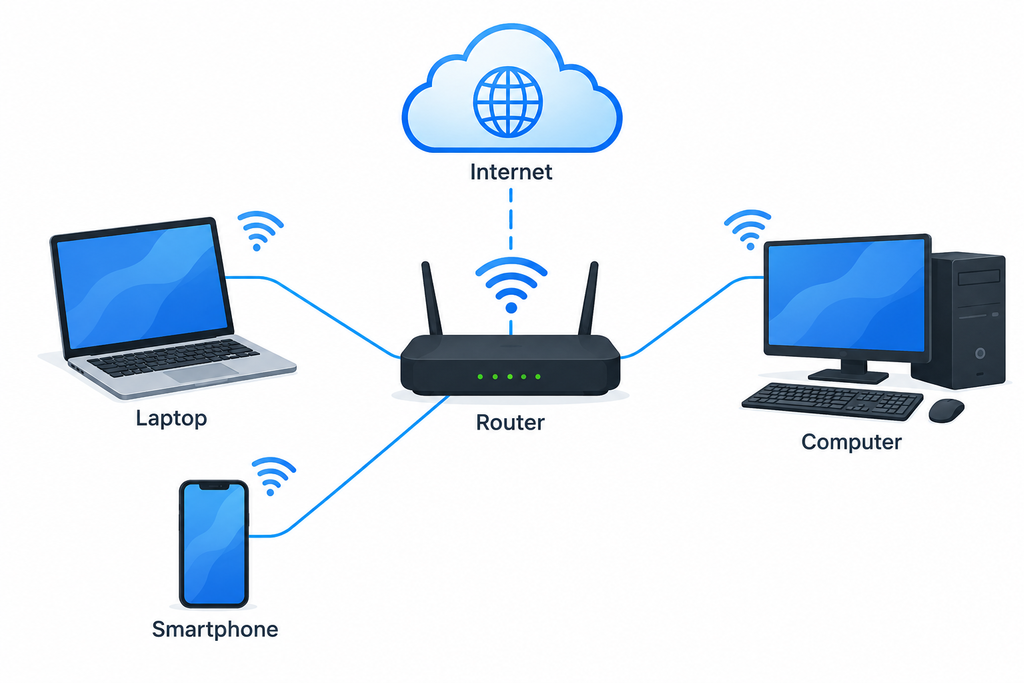
16 — Real-Life Example: Home Network
A typical home network may contain:
Internet
↓
Router
↓
📱 Phone
💻 Laptop
📺 Smart TV
🎮 Gaming Console
🖨️ Printer
The router allows these devices to communicate with the local network and access the Internet.
17 — Real-Life Example: School Network
A school network may connect:
- Computer laboratory
- Teachers’ computers
- Students’ devices
- Printers
- Servers
- Wi-Fi access points
This allows the school to share resources and provide Internet access.
18 — Future of Computer Networking
Networking continues to develop with new technologies.
Future technologies include:
- 5G and future mobile networks
- Internet of Things (IoT)
- Cloud computing
- Artificial Intelligence
- Edge computing
- Smart homes and cities
- Faster fiber-optic networks
More devices are becoming connected every year.
CONCLUSION
Computer networking is an essential part of modern life.
It allows devices to:
Communicate → Share → Connect → Collaborate
From a smartphone connected to Bluetooth earbuds to the worldwide Internet, networks help people and devices exchange information quickly and efficiently.
Final Thought:
“A network connects devices, but communication connects people.”